Open Source Google Search Console Dashboard Alternatives
A comparison of open source and self-hosted tools for visualizing Google Search Console data beyond the default interface.
Google Search Console's built-in interface is functional but basic. If you manage multiple sites, want to combine GSC data with analytics, or just prefer a faster UI, there are several open source alternatives worth considering.
This article compares the main open source tools that work with Google Search Console data, including what each does well and where it falls short.
Why look beyond the default GSC interface?
The default Google Search Console dashboard has a few well-known limitations:
- One property at a time - you have to switch between properties using the dropdown, with no aggregate view
- Limited data export - CSV exports are capped at 1,000 rows
- No GA4 overlay - search performance and site analytics live in separate tools
- 16 months of history - data older than 16 months is not accessible
- Slow interface - report loading can take several seconds, especially for large properties
Open source alternatives address some or all of these by either building on top of the GSC API or providing their own data collection and visualization layer.
Tool comparison
| Tool | Language | GSC data | GA4 data | Multi-property | Self-hosted |
|---|---|---|---|---|---|
| Sitelytics | Rust + React | Yes (API) | Yes (API) | Yes | Yes |
| Plausible | Elixir | Yes (integration) | Own tracking | Yes | Yes |
| Matomo | PHP | Via plugin | Own tracking | Yes | Yes |
| Umami | Node.js | No | Own tracking | Yes | Yes |
| SEO Panel | PHP | Via module | No | Yes | Yes |
| SerpBear | Node.js | No (rank tracking) | No | Yes | Yes |
Plausible Analytics
Plausible is a privacy-focused analytics platform that can be self-hosted under the AGPL license. It recently added a Google Search Console integration that shows search queries and organic performance directly in the Plausible dashboard.
Plausible is excellent as a Google Analytics replacement - lightweight tracking script (under 1KB), no cookies, GDPR-compliant by default. However, its GSC integration is limited to showing query data alongside its own traffic metrics. It does not replicate the full GSC experience (impressions, position, CTR per page, dimension breakdowns).
Best for: teams that want to replace both GA and partially GSC with a single privacy-focused tool.
Matomo
Matomo is the most feature-complete open source analytics platform. It includes heatmaps, session recordings, A/B testing, and form analytics. GSC data can be imported via plugins, though the integration is not as tight as with dedicated GSC tools.
The self-hosted version is free, but the plugin marketplace includes both free and paid extensions. Setup is more involved than lighter alternatives - you need PHP, MySQL, and a web server.
Best for: organizations that need a full GA replacement with enterprise features and can invest in setup and maintenance.
Umami
Umami is a lightweight, privacy-focused analytics tool with a clean interface. It tracks pageviews, sessions, referrers, and basic user behavior. However, it does not integrate with Google Search Console at all - it is purely its own tracking system.
Best for: developers who want simple, self-hosted analytics without any Google dependency.
SerpBear
SerpBear is a self-hosted rank tracking tool. You add keywords and domains, and it monitors your Google search position over time. It does not pull data from the GSC API - instead, it performs its own rank checks.
This makes it complementary to GSC rather than a replacement. You get keyword-level position tracking without the 16-month data retention limit, but you miss impressions, clicks, and CTR data.
Best for: SEOs who need long-term rank tracking for specific keywords.
Sitelytics
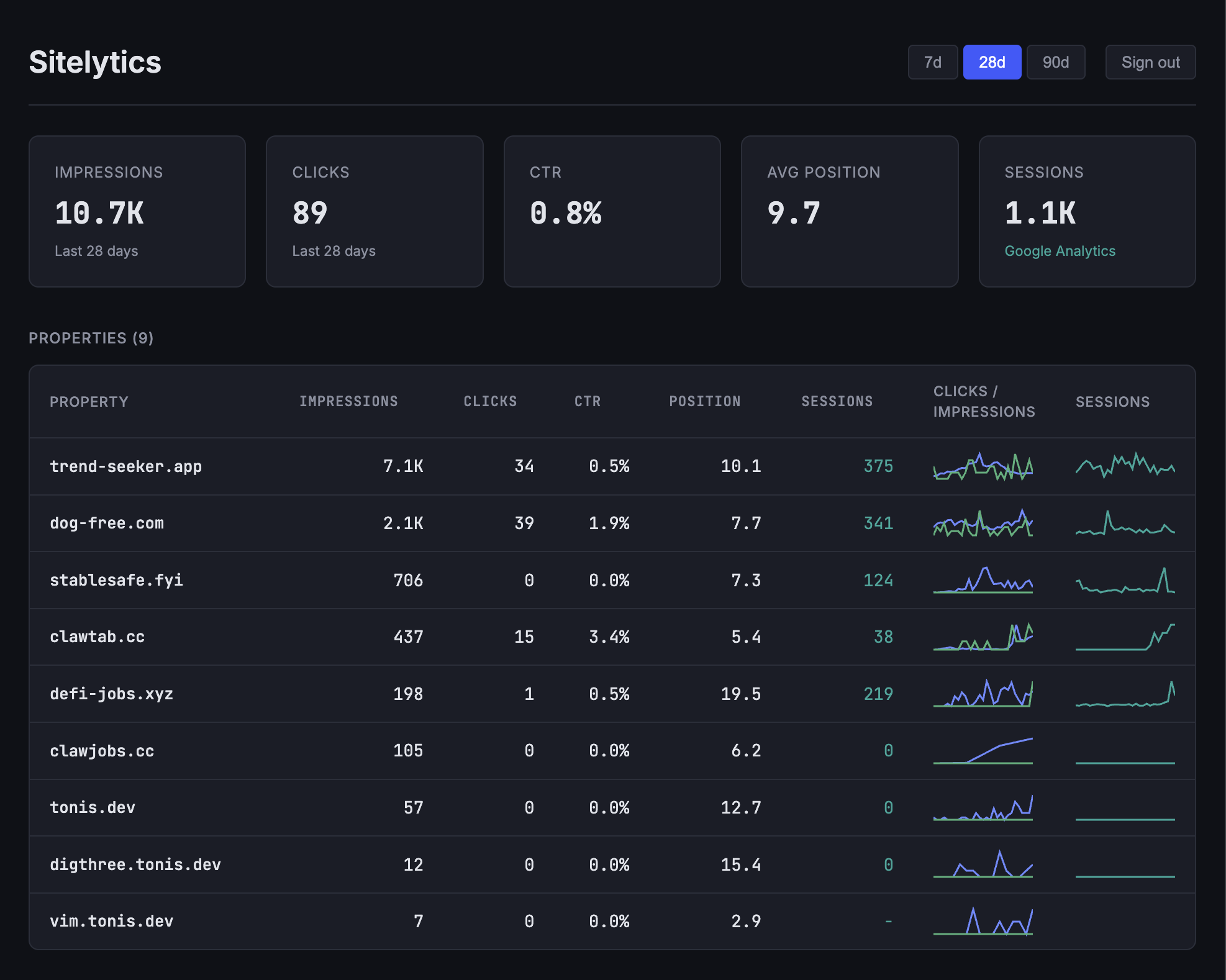
Sitelytics takes a different approach from the tools above. Rather than replacing Google's tracking with its own, it pulls data directly from the Google Search Console and GA4 APIs and presents it in a faster, more unified interface.
Key features:
- Multi-property overview - all your GSC properties on one screen with aggregate impressions, clicks, CTR, position, and GA4 sessions
- Sparkline trends - each property row shows small charts for clicks and impressions so you can spot changes at a glance
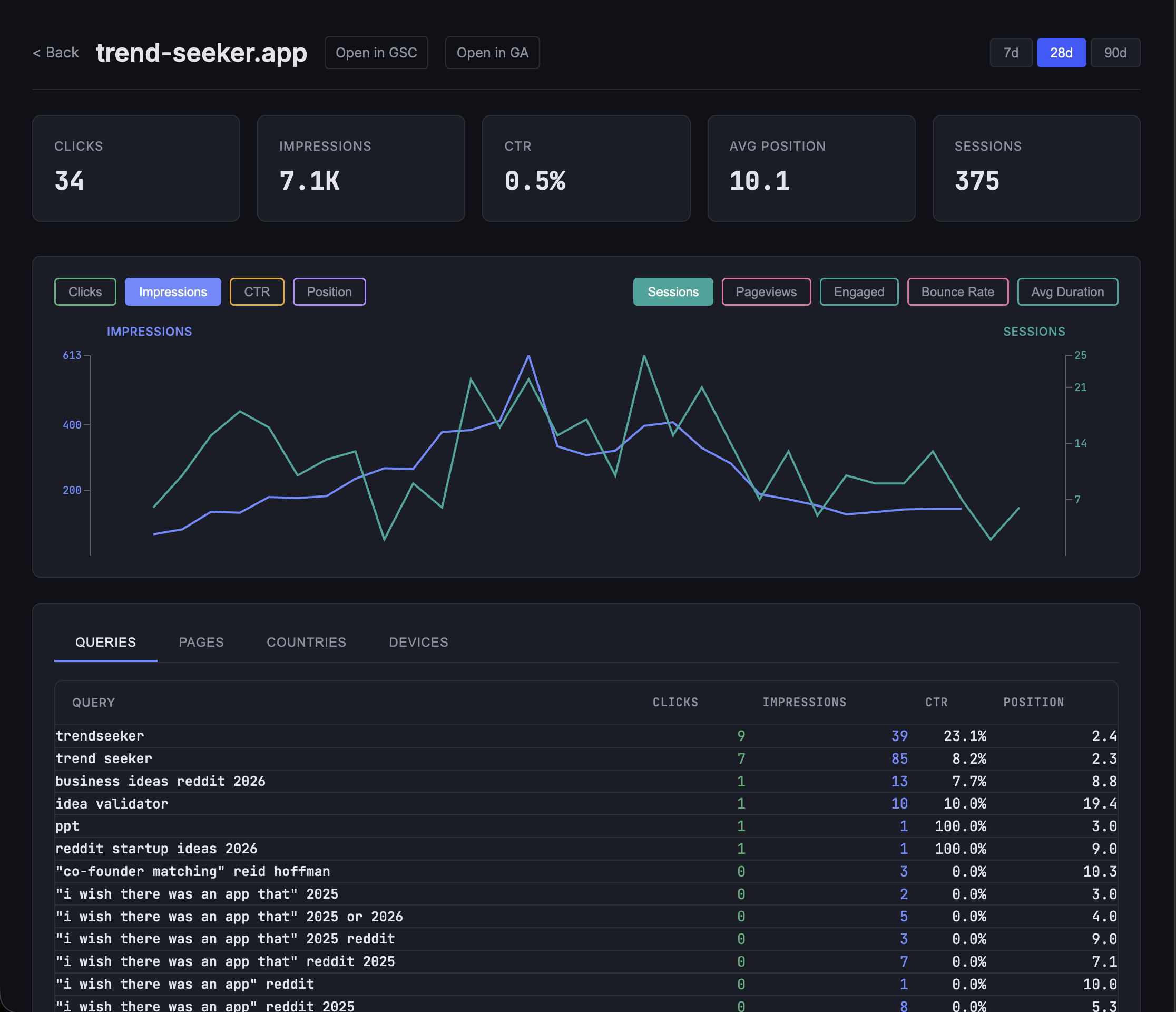
- Interactive detail charts - drill into any property for daily trend charts with toggleable metrics
- GA4 sessions overlay - sessions from Google Analytics appear on the same charts as GSC data
- Dimension breakdowns - analyze by queries, pages, countries, and devices
- Client-side caching - navigate between views without redundant API calls
The backend is written in Rust with Axum, which means API responses are fast even when fetching data for many properties. The frontend uses React 19 with server-side rendering for quick initial page loads.
Which tool should you choose?
It depends on what you need:
- If you want to replace Google Analytics entirely with a privacy-focused alternative, look at Plausible or Umami
- If you need an enterprise-grade analytics suite with every feature imaginable, Matomo is the closest
- If you want to track keyword rankings independently of Google, SerpBear is purpose-built for that
- If you want a fast, unified view of your existing GSC and GA4 data across multiple properties, Sitelytics is built specifically for that use case
Sitelytics is open source (MIT license) and takes about 15 minutes to set up. See the setup guide to get started.